Home
>
Posts filed under
HTML
HTML Paragraph :
The HTML
< p > tag is used to define a
paragraph.
< p > tag makes the piece of text a separate block by adding spaces above and below.
Example :
< p > This is paragraph and
it has multi lines.
But the browser ignores all the enters. < /p >
< p > This is another paragraph.
So to represent paragrah we need p tag.< /p >
Browser view :
HTML Paragraph Justification:
HTML align attribute is used to justify your paragraph as center, left or right. By default justification is aligned to left.
< p align="justify"> This is a paragraph. < /p >
Example :
< p align= "center" > This paragraph is aligned to center. < /p >
< p align= "left" > This paragraph is aligned to left. < /p >
< p align= "right" > This paragraph is aligned to right. < /p >
Browser view :
HTML Line Breaks :
The HTML < br / > tag is used to break a line or to create a new line without changing the paragraph.
Example :
< p > This is paragraph. < br / >
It has multi lines. < br / >
The browser creates a new line after the < br / > tag. < /p >
Browser view :
Heading tag is used to showcase the priority text. Their are six levels of heading according to their importance. They are
< h1 > ,
< h2 > ,
< h3 > ,
< h4 > ,
< h5 > ,
< h6 > where
< h1 > being the most important and
< h6 > being the least important.
Examples :
< h1 > This is top level heading < /h1 >
< h2 > This second level heading < /h2 >
< h3 > This is third level heading < /h3 >
< h4 > This is forth level heading < /h4 >
< h5 > This is fifth level heading < /h5 >
< h6 > This is the lowest level heading < /h6 >
Browser View :
Attributes are unique words used to modify or add functionality to an HTML element to meet users requirements. Attributes are written on the opening tag of HTML elements, after the element's name. All attributes consists of two part - a
name and a
value separated by
= sign.
< element attributename =" value " > content here < /element >
Most often used attributes :
| Attribute name |
Description
|
Example
|
|
id
| id attribute is used to uniquely identify any HTML element | < p id = "para" > This is a paragraph < /p > |
|
class
| class attribute is generally used to associate with a style sheet | class = "classname1, classname2" |
|
style
| style attribute is used for styling of an element. | < p style = "font-family:arial; color:green" > This is a paragraph < /p > |
|
title
| title attribute is used for suggestion of a element. Value of title attribute will be shown on mouseover. | < h1 title = "titleattribute" > Suggestion will be shown on mouseover < /h1 > |
|
href
| href defines a link address. href is used with < a > | < a href = "www.wordsclank.in" > wordsclank < /a > |
|
img
| img attribute are defined for images | < img src = "image.jpg" > |
|
src
| src attribute defines the source of the image. | < img src = "image.jpg" > |
|
alt
| alt attribute is used to show a alternate text. | < img src = "image.jpg" alt = "altrnt_txt" > |
|
width and height
| width and height attributes are used to define the size of an element. | < img src = "image.jpg" width="20px" height="20px" > |
We will learn a lot of attributes later. These the most often used HTML attributes.
An HTML element is fundamental of HTML document. An HTML element is the whole thing from opening tag to the closing tag along with the content in between the tags.
1
| < tag > Content here < /tag >
|
Here, < tag > is starting tag and < /tag > is closing tag and Content here is the content between the tags. So the whole < tag > Content here < /tag > is an HTML element.
Nested HTML Elements :
HTML elements can contain another HTML element.
This the correct way of nesting.
Child and Parent elements :
When you nest HTML elements it creates a child and parent relationship between the elements. Here you can see that the title tag is created in between the head tag. And head and body tag is created within the html tag. So head and body tags are the child of html tag and also title is the child of head tag.
Explanation with an example :
1
 2
 3
 4
 5
 6
 7
 8
 9
10
11
12
13
| <!DOCTYPE html>
< html >
< head >
< title > HTML Elements < /title >
< /head >
< body >
< h1 > HTML Elements < /h1 >
< p >
Nested elements < br >
Empty HTML elements
< /p >
< /body>
< /html>
|
- < html > element defines the whole document. It have a opening < html > as well as a closing tag < /html >.
- < head > and < body > tags are the child of the parent tag < html > tag.
- < h1 > tag defines heading. It have also opening < h1 > as well as a closing tag < /h1 >.
- Similarly < p > tag is used for paragraph.
- < br > tag defines line break. It is an empty HTML element.
Empty HTML Elements :
An empty HTML elements are those which don't have any content. Means it ends where it start. An empty HTML elements can be closed on the opening tag. For example, < br > is an empty HTML element which defines line break. We can also write it as < /br >.
What is HTML Editor?
An HTML Editor is a tool or a part larger integrated development environment (IDE) which provide a space to write your piece of code. Not only editing or writing code but also compiling, interpreting, and debugging code. There are several HTML editors you can get on Internet. You can choose and use anyone of them. However for learning purpose we suggest you to use a simple text editor.
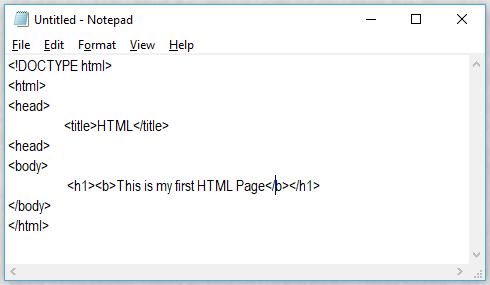
We will now create your first HTML page.
Write the code:
- Open Notepad or any Text Editor.
- Write your first code on the blank space.
1
2
3
4
5
6
7
8
9
| <!DOCTYPE html>
<html>
<head>
<title>HTML</title>
<head>
<body>
<h1><b>This is my first HTML Page</b></h1>
</body>
</html>
|
- Save the HTML page with .html or .htm extension. For example myfirstcode.html or myfirstcode.htm .
View your HTML Page on browser:
- Open your HTML file (example: myfirstcode.html or myfirstcode.htm ) by double clicking it or right click on the file and choose open it and choose your browser.
HTML is short for Hyper Text Markup Language which is standard markup language for creating web pages (electronic documents on world wide web). It was first developed by Tim Berners-Lee in 1990. HTML pages are build through HTML elements and the HTML elements are represented by tags.
HTML Tags :
HTML tags are building component of HTML page. Tags are used to mark up the start of an HTML element. Tags are enclosed with angular brackets such as < b >< /b >, < img > etc. Generally they come in pair.
< tag > Content here... < /tag >
is known as opening tag and the angular bracket with backslash is known as closing tag.
The content withing the opening and the closing tag will be executed according to the tagname by the browser.
Lets begin with a simple code :
<! DOCTYPE html >
< html >
< head >
 < title > HTML < /title >
< head >
< body >
< p >Welcome to HTML Tutorials by < b >< i>wordsclank < /i >< /b > < /p >
< /body >
< /html >
Explanation:
- < ! DOCTYPE html > is not an HTML tag. It only instruct the web browser about the version HTML the page is written in.
- < html > is the container of all other elements.< /html >
- < head > is the container for meta data or data about data like document title, character set, styles, links, scripts, and other meta information.< /head >
- The content between < title > and < /title > is shown on browser's title bar.
- Within the < body > and < /body > tag all your code or the main content will be written.
- < p > tag is used for paragraphs.
- < b > < i > tags are for bold and italic.
Browsers view :