wordsclank.in: visual basic
Showing posts with label visual basic. Show all posts

Wednesday, 12 April 2017

Visual Basic 6 | Convention of Fahrenheit and Celsius at a same time with Scroll Bar

Guys
In this post we will discuss another funny as well as interesting program in Visual Basic i.e, making temperature scale with Scroll Bar where both the Fahrenheit and Celsius will change at a same time .

Scroll bar control is vary good tools for the programmers of Visual basic.It is vary essay to use,It is of two form horizontal and vertical.We can place it in form according to our needs or choices.

We have done our design in such a way
Fahrenheit and Celsius,Visual Basic
We took four labels only and a scroll option.


Changed Property
          Label1:
                  caption :Fahrenheit
          Label2:
                  caption: Celsius
          HScroll1:
                  maximum:100
                  minimum:0

Problem Statement:
     Write a program in Vb to convert Fahrenheit and Celsius at a same time using scroll bar.

Source Code:
Private Sub Vscroll1_Change( )

         Dim C as Integer

         Dim F as Integer

            Label1.Caption = VScroll1.Value

              C = Val(Label1.Caption)

              F = 9/5*C + 32

            Label2.Caption =  F

      End Sub


  • The source code is written under Change event of VScroll. 
  • Dim is used to declared a variable.
  • Val function is used to change a string to numeric.

Thanks for reading this post.Hope this will help you.
If you have any doubt comment bellow , we will be happy to help you.

Read more ...

Sunday, 9 April 2017

Visual Basic | Fibonacci Sequence

Guys..
We are going to generate Fibonacci sequence in Vb.Fibonacci series is the series in the the first term starts from 0 and next term will be addition of the previous two terms.

we will design the form in which we will take one text box for taking the input up-to which the series will be generated and one command button.

Fibonacci series, Visual Basic
we will write the code under the click event of command button.


SOURCE CODE


Private Sub Command1_Click( )


Dim  n, a, b, c as Integer

n = val(Text1.Text)

  a =0

  b =1

  Print a

  Print b

 For i = 1 To n - 2

    c = a + b

    a = b

    b = c

    Print c

 Next i

End Sub


NOTE:
 1.The program uses if next loop structure.
 2.Dim is used to declared a variable.
 3.Val function is used to change a string to numeric.

Thanks for reading the post.Hope this will help you.If you have any doubts comment on the comment section, we will be happy to help you.
Read more ...

Saturday, 8 April 2017

Visual Basic | Traffic signal using if-else loop

Hi guys.
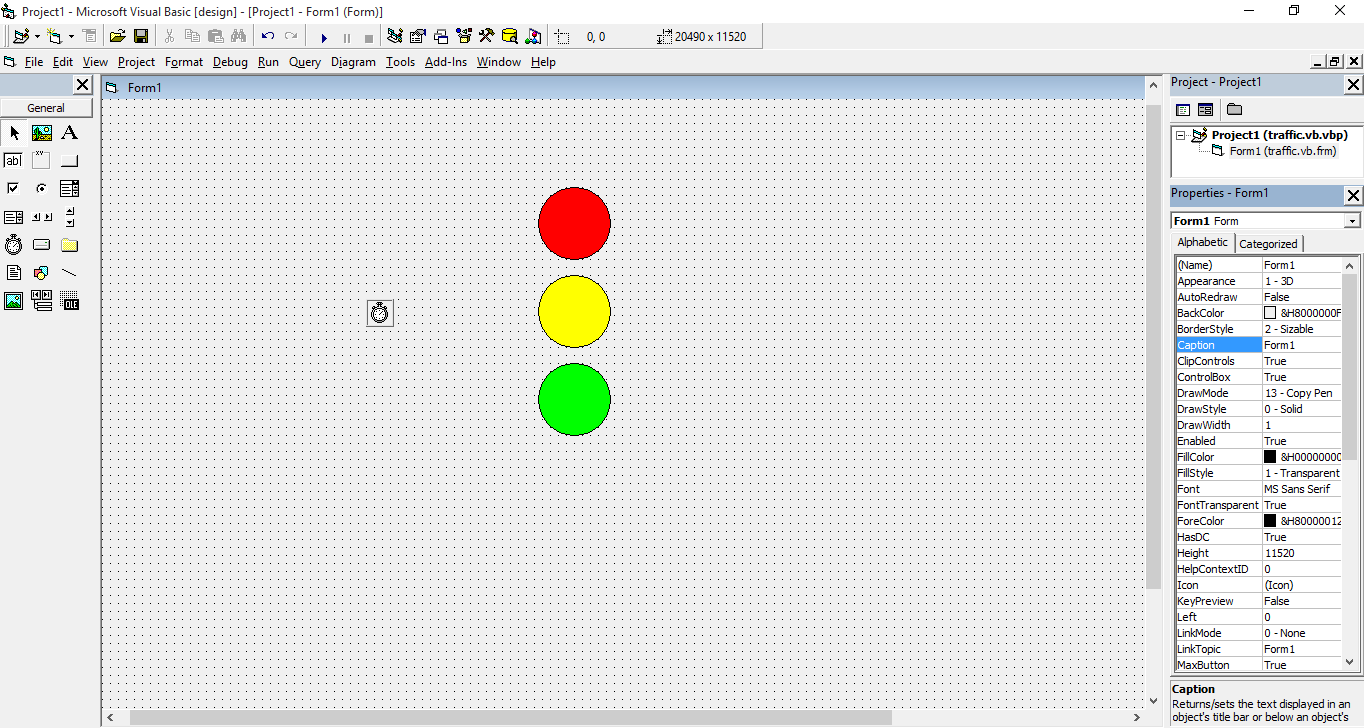
We have already discuss piggy bank  and we are now going to discus another vb program i.e, Traffic Signals and we are sure it will be more fun.

So let start with the form design first.
traffic light,Visual Basic,


Here we have taken a timer and three circular shapes from the shape tool option.
Next arrange them in a sequencing meaner. Change the property of backstyle to opaque
and add color to the shapes.Then add a timer to the form.

Changed property:
   shape1:
      backstyle   : opaque
      backcolor   :red
   shape2:
       backstyle  :opaque
       backcolor  :yellow
  shape3:
       backstyle  :opaque
       backcolor  :green
 Timer1:
       interval  :3000


Moving to the source code
        We will write the code under the timer1's  timer event.


SOURCE CODE

Private Sub Timer1_Timer()
 If shape1.Visible = True Then

       shape2.Visible = True

       shape3.Visible = False

       shape1.Visible = False

   Else If shape2,Visible = True Then

        shape3.Visible = True

        shape1.Visible = False

        shape2.Visible = False

  Else shape2.Visible = False

        shape3.Visible = False

        shape1.Visible = True

  End If

End Sub


NOTE:

1. In the interval property of the timer we have given 3000. Here 1000 means 1 sec time interval.

2.The program uses If - Else loop statement.

3.The properties are changed through property toolbar.

Thanks for reading.If you have any doubt comment on the comment section, w|e will be vary happy to help you..


Read more ...

Making Piggy Bank | visual basic 6.0

Hi..
Its very fun to work in visual basic 6.0. Now what are going to do a simple program i.e a Piggy Bank using visual basic.

so let start from the design

piggy bank,Visual Basic

Here is the design we have made. You can make the design in your way also.

we have taken    6 label , 4 text box , 1 command button
               four labels for 1 rupees , 2 rupees ,5 rupees and 10 rupees
               one for displaying TOTAL and one for caption TOTAL
               4 text box for taking the inputs from user


Now proceed to the code part

we are writing the code under the click event of command button
Private Sub Command1_Click()

   Dim n, m, o, p, q as integer

   n val(text1.text)

   m val(text2.text)

   o val(text3.text)

   p val(text4.text)

   q p


  Label6.Caption q


End Sub


NOTE
1. Dim is used to declared a variable. Here we have declared m,n,o,p,q as integer data type.

2.Val function is used to change a string to numeric

3. Label6 is name of the label on which we are displaying the result.

4.We have change the property through property bar if it is creating problem then comment on this post and  we will try to give you the code for changing the caption,text and etc.


Thanks for reading the post. Hope it will help you. If  have any doubt comment in comment section we will vary much happy to help you..


Read more ...